Short write-ups, usually about something that was broken for an afternoon and turned out
to have a one-line cause. Also available as RSS.
adding a window without inflating the binary
Two posts ago I said the size was the feature. So naturally the next thing I did was add a
GUI, which is exactly the kind of change that turns 1.5 MB into 15.
The escape is that the window doesn't have to live in the same file. The three jobs were already
mostly logic with a thin layer of printing on top, so I moved the logic into a library and left
main.rs as the front-end that prints. swiss-gui is a second binary that
calls the same library. One implementation, two ways in.
That's what makes the preview trustworthy. When you tweak a social card in the window, the image
you see isn't a mock-up of the output — it's the same function that writes the file, called into
memory instead of onto disk. If the preview and the file ever disagree, that's a bug, not a
design decision.
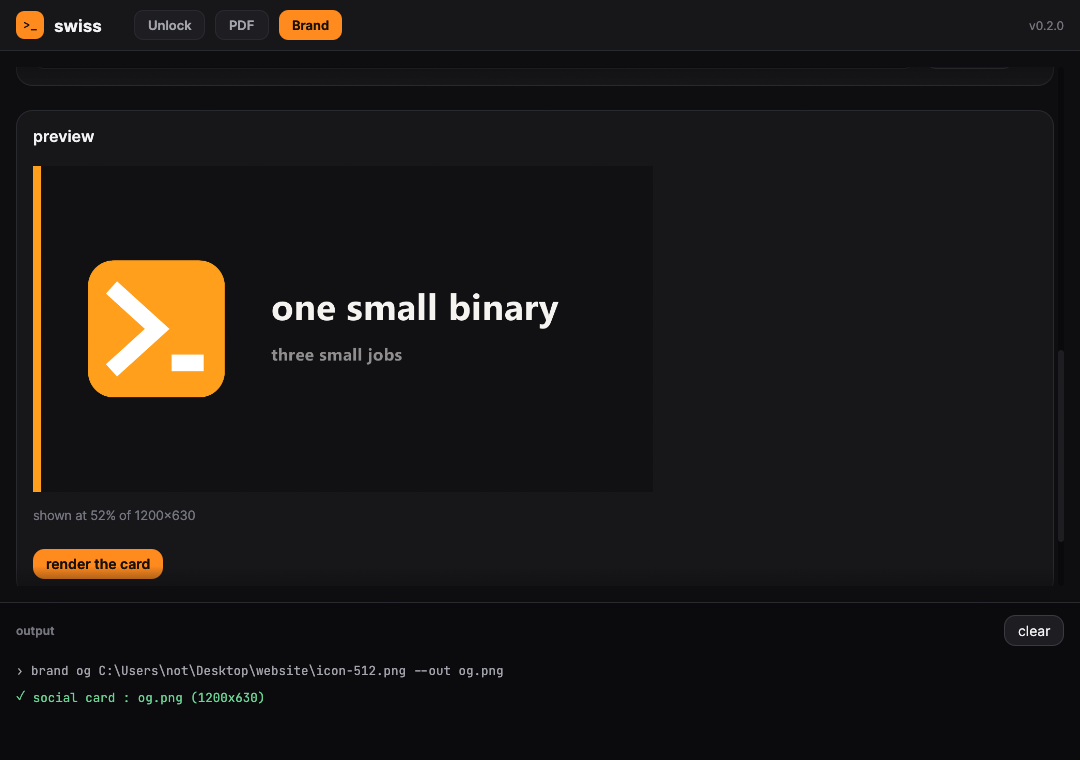
The Brand tab. That card at the bottom isn't a mock-up — it was rendered by the same function
that writes the file.
two things that bit me
Profile overrides only work in the root manifest. I wanted
opt-level = "z" everywhere except the hot egui crates, because per-frame layout is
visibly sluggish when size-optimised. I put the overrides in the GUI's
Cargo.toml. Cargo ignored them entirely, and said nothing about it. They have to be
in the workspace root:
[profile.release.package.egui]
opt-level = 3
Since only the GUI links egui, the command line never sees any of this.
Embedded fonts don't replace the built-in ones. To make the window look like the
site I embedded Inter and JetBrains Mono, which is about a megabyte of the GUI and worth it. But
Inter has no arrows and no emoji, so the first build had list buttons you couldn't see. egui's
own fonts stay in the stack behind Inter, purely as fallback.
The card renderer is the one place I deliberately didn't use the site's font, because
swiss brand og draws the cards already on this page with your system font. Matching
the site inside the window is nice. Quietly restyling every existing card is not.
The command line comes in at 1.55 MB. The window is a second download, and a much bigger one —
about 10 MB, because egui is not a small toolkit. It's there for people who want it, and it costs
the command line nothing.
why my certificate wouldn't issue
I pointed my domain at GitHub Pages and the Enforce HTTPS checkbox sat greyed
out, with “The certificate does not exist yet.” Every check I knew how to make said my
DNS was perfect: the four GitHub A records on the apex, no AAAA or CAA
records, no DNSSEC, and no trace of the old host.
The actual cause was dumber, and I could not find it documented anywhere.
GitHub asks Let's Encrypt for a certificate, then polls DNS to prove you control the domain.
My first check ran while the old A record was still cached, so it failed. That part is
normal. What isn't obvious is that the job does not simply retry — it backs off, and the delay
gets longer every time. So each subsequent attempt reused the same stale answer and it settled
into a comfortable permanent failure.
There is no button to force a re-check. But the certificate request is tied to your
custom domain setting, not to your site's content. So you can make it start over
by removing the domain and putting it back:
A fresh certificate appeared in about twenty seconds — state: approved, expiring
2027-01-14. Same DNS the whole time.
The lesson: if your certificate won't issue, don't debug your DNS. It is almost
certainly fine. Debug GitHub's cached view of it. And once the backoff has grown, waiting will
never fix it — you have to make it ask again from scratch.
one 1.5 MB binary, three jobs
swiss is a command line tool that does three
unrelated things I kept needing, in one binary:
unlock — find out what process is holding a file hostage, and optionally kill it.
pdf — merge, split, rotate, strip metadata, or inspect a PDF.
brand — turn one image into a full web branding set: favicons, an app manifest and a social card.
The interesting one is unlock, because the easy way to find a file lock on
Windows is to run handle.exe from Sysinternals and parse its output. I didn't want a
second download. Windows has had a proper API for this since Vista — the
Restart Manager — and nobody remembers it exists. You open a session, register the
file, ask who's using it, and get back a list of processes. It is exactly the API Windows Update
uses to work out what's blocking a reboot.
pdf is built on lopdf. The trick that mattered most was pruning: after
splitting a document you have to drop the unused objects and renumber the survivors, or each
output page carries the entire original file with it. Doing that took split output from roughly
a megabyte per page down to about 100 KB.
brand does its own text rendering with fontdue and writes
favicon.ico by hand — it's just a header followed by PNG payloads — so there's no
image processing dependency to install.
The whole thing lands at 1.52 MB. That's mostly the release profile rather than
anything clever I did:
Honestly the size is the feature. A tool like this is only useful if grabbing it is easier than
not grabbing it.
the artwork on this site made itself
Every image on this site is generated by swiss, the same binary from the previous
post. I find this funnier than it probably is. When I add a project, I don't open a design app —
I run one command.
The little coloured marks next to each project are drawn with raw pixel primitives, no SVG and no
fonts: a rounded square, then the glyph on top. A Swiss cross is two rectangles. The swap arrows
are two rectangles and two triangles. The chat bubble is a rounded rectangle, a triangle for the
tail, and three circles punched through in the background colour.
Those marks then go through swiss brand og, which draws the dark card, the accent
bar, the mark on the left and the text on the right.
swiss brand og mark.png \
  --title "swiss" \
  --subtitle "one small binary, three small jobs" \
  --size 1280x720
why 1280x720 and not the usual 1200x630
Almost every guide tells you to make social cards 1200×630, because that's what Facebook
standardised. These cards aren't only social previews though — they're also the thumbnails on the
project grid, and that grid crop is aspect-ratio: 16/9 with
object-fit: cover.
1200×630 is 1.9:1. A 16:9 box is 1.78:1. So the browser would trim roughly 43 pixels off each
side, and the first thing it would eat is the accent bar down the left edge — the one element
holding the whole design together.
1280×720 is exactly 16:9, so cover crops nothing at all. One image, correct in both
places. Sometimes the boring answer is just the right dimensions.